

Table of Contents
- Step 1: Assess Your Current Posture at Work
- Step 2: Build an Ergonomic Desk Setup for Back Pain
- Step 3: Practice Exercises for Desk Posture Daily
- Step 4: Use Habit Stacking and Visual Cues to Fix Posture
- Step 5: Know When to Seek Chiropractic Care for Office Workers
- Common Mistakes That Sabotage Your Posture Progress
- Conclusion: Make Posture Correction a Daily Habit
- Frequently Asked Questions
Last Updated: September 14, 2026
Step 1: Assess Your Current Posture at Work
Knowing how to fix posture for office workers starts with an honest look at how you sit right now. Most people assume their posture is fine until chronic neck or back pain proves otherwise. At Dr. Gil Center for Back, Neck, and Chronic Pain Relief, we understand how small misalignments can compound into daily pain.
Postural fatigue, the gradual collapse of your seated position over a workday, drives most office-related discomfort. Your body drifts toward whatever feels easiest, not what supports your spine.
Here’s a quick self-assessment you can do today:
- Sit normally for two minutes without adjusting. Have someone photograph you from the side.
- Check whether your ears, shoulders, and hips stack vertically. Most people find their head juts forward and shoulders round.
- Notice where you feel tension. Upper trapezius tightness and rounded shoulders are early warning signs.
- Time how long you stay in one position before shifting. Fewer than 15 minutes signals postural fatigue.
The Occupational Safety and Health Administration’s ergonomics guidance notes that work-related musculoskeletal disorders remain among the most common workplace injuries, and prolonged static sitting is a major contributor.
That baseline tells you where to focus. Without it, you’re guessing.
Step 2: Build an Ergonomic Desk Setup for Back Pain
An ergonomic desk setup for back pain starts with three adjustments: chair height, monitor position, and input device placement. Get these right and you remove most of the mechanical strain from your workday. But the standard checklist assumes a desktop tower, a separate monitor, and a dedicated office, most people now work from a laptop on a kitchen table or split time between sitting and standing. The adjustments below cover both the classic setup and non-traditional ones.
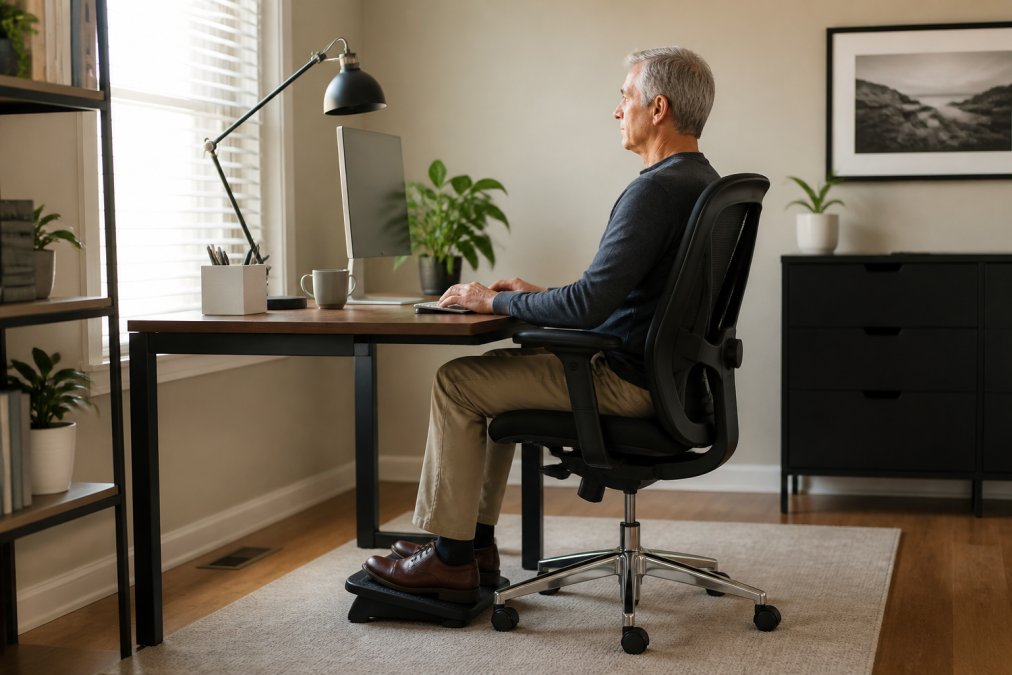
Start with your chair. Set the seat height so your feet rest flat and your knees sit at roughly a 90-degree angle. If your desk is fixed and your chair ends up too high, a footrest closes the gap. Adjust the backrest so it contacts your lumbar spine, preserving the natural inward curve of your lower back. The seat pan should leave two to three fingers of space behind your knees so the edge doesn’t press into your thighs and cut off circulation.
Next, position your monitor. The top of the screen should sit at or slightly below eye level, roughly an arm’s length away; a monitor arm makes this easy to fine-tune. Looking down at a laptop all day forces your cervical spine forward and loads your neck muscles. Every inch the top of your screen drops below eye level adds load to the muscles at the base of your skull, which is why laptop-only users feel tension there first.
Finally, your keyboard and mouse. Your elbows should rest near a 90-degree angle with wrists straight, not bent upward into wrist extension. A keyboard tray helps if your desk sits too high. Keep the mouse close to the keyboard so you aren’t reaching across your body, which rotates your torso and pulls your shoulder forward.
| Adjustment | Target Position | What It Prevents |
|---|---|---|
| Chair height | Feet flat, knees at 90 degrees | Hip and knee strain |
| Lumbar support | Contact with lower back curve | Lower back pain |
| Monitor height | Top at eye level | Neck and cervical strain |
| Keyboard position | Elbows at 90 degrees, wrists straight | Wrist and shoulder tension |
| Seat pan depth | Two to three fingers behind knees | Thigh pressure, circulation loss |
Laptop-Only, Hybrid, and Standing Desk Adjustments
A laptop is the worst ergonomic device ever designed for prolonged use, because the screen and keyboard are locked together. Raising the screen to eye level forces your arms up; lowering it to type forces your neck down. You cannot fix both with the laptop alone. The practical fix is a laptop stand paired with an external keyboard and mouse; without those, raise the laptop on a stack of books and accept that you’ll type less comfortably until you add peripherals.
For hybrid workers who move between a home desk and an office desk, don’t memorize two setups. Learn the three checkpoints you can verify in ten seconds anywhere: feet flat, screen top at eye level, elbows at 90 degrees. If any one is off, adjust that one thing. This portable checklist travels better than a fixed measurement.
Standing desks introduce their own trap: standing is not automatically better posture. If you stand with your hips pushed forward and your weight locked into one leg, you load your lower back more than sitting would. Set the desk so your elbows sit at 90 degrees with shoulders relaxed, keep your feet hip-width apart, and alternate weight evenly. Most sources suggest a sit-stand ratio closer to 1:1 or 2:1 rather than standing all day, because static standing can produce its own fatigue pattern in the calves and lower back (osha.gov).
Budget-Friendly Ergonomic Adjustments
You don’t need expensive equipment to fix posture. A stack of books under your monitor raises it to eye level. A rolled towel behind your lower back offers lumbar support. A small box under your desk becomes a footrest. A ream of paper under a laptop stand adds the last inch of height. These low-cost fixes deliver most of the benefit of dedicated equipment, and they let you test what works before spending money.
If you do buy, prioritize in this order: an external keyboard and mouse first (they unlock every other laptop fix), then a laptop stand or monitor riser, then lumbar support, then a footrest. A chair is the biggest investment and the hardest to get right without trying it, so test one in person first.
Set a recurring phone reminder to re-check your setup once a month. Chairs slip, monitors drift, and small changes creep in without you noticing. If you rotate between locations, run the three-checkpoint test at each one on the same day so you’re comparing fairly.
Step 3: Practice Exercises for Desk Posture Daily
Exercises for desk posture work best when they’re short and frequent, not long and occasional. Two or three minutes, several times a day, beats one 30-minute session you never repeat. Postural muscles are endurance muscles, not strength muscles: they fail from sustained low-level load, not from being weak in the gym sense. Training them means training their stamina, which responds to frequency far more than intensity.
A complete corrective sequence has three parts: release the tight muscles, activate the weak ones, then integrate the new position into movement. Skip the release step and you stretch your chest, feel loose for an hour, and tighten right back up. Skip the integration step and the correction never shows up when you’re actually working.
The Full Corrective Sequence
Release (tight muscles). The chest, the upper trapezius, and the hip flexors tighten from prolonged sitting. A doorway chest stretch, a gentle upper-trap stretch with the head tilted away from the shoulder, and a standing hip-flexor stretch each held 20 to 30 seconds per side loosen the structures that pull you forward.
Activate (weak muscles). Chin tucks strengthen the deep neck flexors and counter forward head posture: sit tall, pull your chin straight back as if making a double chin, hold five seconds, release, ten reps. Scapular retraction, squeezing your shoulder blades together and down, activates the muscles between your shoulder blades that slouching weakens; hold five seconds, ten reps. Add a third move most guides skip: a seated glute squeeze or standing hip hinge to wake up the posterior chain that supports your pelvis, ten slow reps.
Integrate (carry it into work). After the release and activation, sit back down and hold the corrected position for 30 seconds while breathing normally. This teaches your nervous system that the new position is the default, not a temporary stretch.
Micro-Breaks and the Frequency Rule
Micro-breaks matter just as much as the exercises. Standing every 30 to 45 minutes interrupts the static load on your spine and lets postural muscles reset (the CDC). Set a timer, walk to fill your water bottle, take the long way to the printer. The goal isn’t a workout; it’s interrupting fatigue before it becomes a slump.
A practical pattern: do the full sequence once in the morning, once after lunch, and once mid-afternoon, using micro-breaks to stand and reset between them. That’s roughly six minutes of exercise spread across the day, far easier to sustain than a single 30-minute block.
Pushing through sharp pain during any exercise is a mistake. Discomfort from stretching is normal; sharp or radiating pain is not. Stop and get it evaluated.
Frequency beats duration. Three short sessions a day retrain postural endurance faster than one long session, because the muscles you’re targeting recover quickly and respond to repeated low-level demand.
Step 4: Use Habit Stacking and Visual Cues to Fix Posture
Habit stacking is the most reliable way to fix posture because it ties new behavior to routines you already have. The trigger behind slouching is simple: your brain defaults to whatever requires the least effort. Willpower fades by mid-afternoon; habits don’t.
Attach a posture check to something you already do. Every time you answer the phone, sit tall and pull your shoulders back. Every time you finish a meeting, do one chin tuck. Every time you refill your coffee, stand and reset.
Visual cues reinforce the habit. Put a small sticker on your monitor bezel, set your phone wallpaper to a reminder, or place a sticky note at the edge of the screen, every time your eyes pass it, check your alignment.
The goal isn’t perfection. It’s frequency. Ten brief corrections a day retrain your default position faster than one heroic effort.
Step 5: Know When to Seek Chiropractic Care for Office Workers
Chiropractic care for office workers helps when self-correction and exercise aren’t enough. If you’ve adjusted your setup, built movement breaks into your day, and still wake up stiff or numb, the problem may sit deeper than posture alone.
Warning signs that warrant an evaluation:
- Pain that radiates down an arm or leg
- Numbness or tingling in your hands or feet
- Headaches that start at the base of your skull
- Stiffness that doesn’t ease with movement
- Pain that disrupts your sleep
These symptoms can point to nerve involvement, disc issues, or joint dysfunction that posture changes alone won’t resolve. A qualified provider can assess your spinal alignment, movement patterns, and muscle balance to identify what’s driving the pain.
At Dr. Gil Center for Back, Neck, and Chronic Pain Relief, our team builds personalized treatment plans rather than applying the same protocol to every patient. With more than 28 years of experience, we combine traditional chiropractic techniques with advanced tools like spinal decompression, Class IV laser therapy, and MedX rehabilitation. Our focus is on helping you recover without unnecessary or costly treatments, and on giving you the education to maintain that progress.
This is general information, not a diagnosis. If your symptoms concern you, a consultation with a qualified professional is the right next step.
Common Mistakes That Sabotage Your Posture Progress
The biggest mistake is treating posture as a one-time fix. Adjusting your chair may provide temporary relief, but without consistent practice, old habits can return. Posture correction is a daily practice, not a project you complete.
A second common error is focusing only on the upper body. Rounded shoulders and forward head get all the attention, but hip alignment and pelvic tilt drive much of the strain in your lower back. If your pelvis tilts forward or back, your whole spine compensates.
Third, many people stretch tight muscles without strengthening weak ones. Stretching your chest feels good, but if you never strengthen the muscles between your shoulder blades, the tightness returns. Balance matters more than relief.
Finally, ignoring pain until it becomes chronic. Early intervention is almost always simpler and less disruptive than waiting for a problem to become entrenched.
Conclusion: Make Posture Correction a Daily Habit
Chronic office-related pain rarely comes from one bad day. It builds from months of small, repeated strain your body quietly absorbs until it can’t. The same principle works in reverse: small, repeated corrections add up to real change.
If you’ve done the setup work, built the movement breaks, and still feel persistent neck, back, or joint pain, it may be time for a professional assessment. Dr. Gil Center for Back, Neck, and Chronic Pain Relief offers personalized treatment plans, spinal decompression therapy, Class IV laser therapy, and MedX rehabilitation, all designed around your specific needs rather than a one-size-fits-all approach. Our team has helped patients across Middle Tennessee recover from chronic pain and rebuild their quality of life.
Get started with Dr. Gil Center for Back, Neck, and Chronic Pain Relief and take the first step toward lasting relief.
Frequently Asked Questions
Can you correct years of bad posture?
Yes, you can improve posture even after years of slouching. Muscles and joints adapt with consistent effort. Focus on daily exercises for desk posture, such as chin tucks and scapular retraction, and set up an ergonomic desk. For chronic pain or structural issues, chiropractic care for office workers can help. Start with small changes and be patient.
What is the 90-90-90 rule for sitting?
The 90-90-90 rule means your hips, knees, and elbows should each be bent at a 90-degree angle when seated. Adjust your chair height so your feet rest flat on the floor or a footrest, and your thighs are parallel to the ground. Your elbows should be at 90 degrees with your keyboard and mouse within easy reach. This setup reduces strain on your lower back and wrists. Following this rule can help lessen postural fatigue.
Do posture correctors work for desk jobs?
Posture correctors can provide temporary reminders to sit up, but they don’t strengthen the muscles needed for lasting change. They may help you become more aware of your slouching, but relying on them long-term can weaken your core and back muscles. Instead, use them sparingly alongside exercises for desk posture and an ergonomic desk setup for back pain. For chronic issues, consult a chiropractor for a personalized plan.
How often should I take breaks to improve posture at work?
Take a micro-break every 30 minutes to stand, stretch, or walk for 1-2 minutes. This prevents postural fatigue and reduces stiffness. Set a timer or use an app to remind you. During breaks, do a few chin tucks or shoulder rolls. If you have pain, consider a 5-minute break every hour for gentle stretching. Consistent movement is key to fixing posture for office workers.


